Pre-Accounting: where good books start
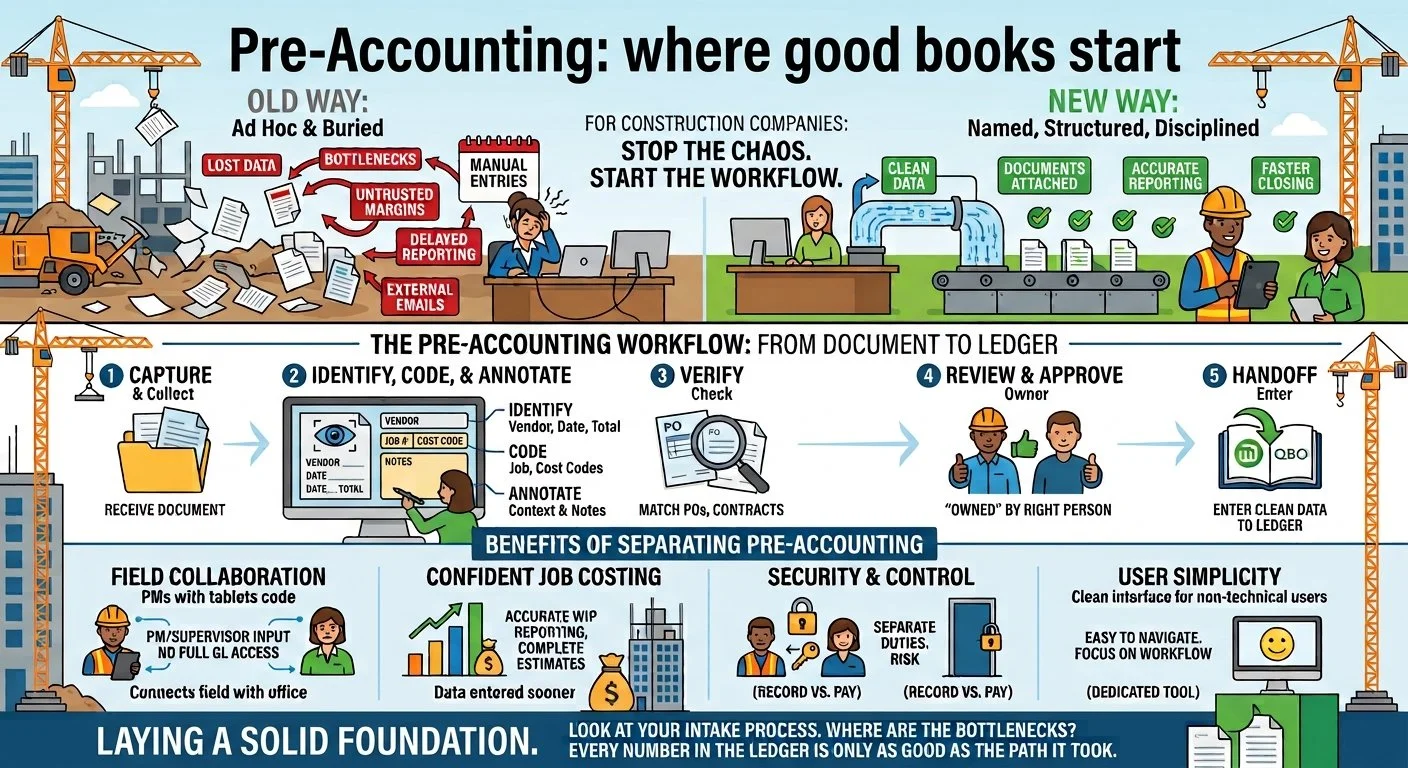
Every business does pre-accounting, but almost nobody names it, let alone treats it as its own set of structured systems. The work is usually buried inside bill pay, AP, or “data entry,” which hides where most bookkeeping accuracy is actually won or lost. When it’s treated as its own discipline, with its own people, tools and standards, the books get better and the whole system runs more efficiently.
1. A Familiar Monday
It’s Monday, and the bills, receipts, vendor credits and POs have already started hitting the company’s AP inbox. You open one from a regular vendor and notice that it doesn’t mention a job. So you forward it to your PM. Two days later, they reply with the job and ask you to send it to the site supervisor on that project for review. You do, and you wait another two days for a response. It’s a week or more before the transaction is finally entered in QuickBooks Online (QBO). This plays out over and over at most businesses, and especially in construction, where volume is heavy: transactions arrive all day, every day, often missing key information.
To make matters more complex, many businesses have added review and approval steps to their transaction intake. Team members are asked to inspect transactions tied to their projects, transactions above a certain dollar amount, or bills from certain vendors. These processes are often managed through complicated folder systems in Google Drive or Dropbox, and they drag out the time it takes to get transactions recorded in the accounting system even further.
Together, catching and correcting problems on transactions and pushing them through a structured review add a lot of time to the intake process. They create a heavy workload and often introduce bottlenecks that slow data entry and make reporting less timely. For businesses running on tight margins, this is more than an annoyance. It can create real structural problems.
It’s worth pointing out that none of the work I’ve described is “accounting” in the way we usually think of it. These steps come before the accounting work that happens in QBO (bill pay, invoicing, reconciliation and so on). They happen on the way to the accounting system, before the transaction has been “posted,” or recorded on the general ledger. But as the example above shows, this work is absolutely critical. And it has a name: pre-accounting. Naming it lets us see the work as its own discipline, with its own people, tools and standards.
2. What Is Pre-Accounting?
Pre-accounting is what we do with transactions before we record them in the accounting software. It’s how we manage them from the moment a document arrives, through review and approval, until it’s finally committed to the ledger. The steps vary from one organization to the next, but they often include:
Capture: receiving and collecting the document
Identification: vendor, document type and so on
Classification: job, cost code or chart of accounts, class and so on
Verification: checking against POs, contracts and change orders
Review and approval
Annotation: adding notes and context
Handoff: entering the complete, verified record into the accounting software
None of these steps is “accounting” in the traditional sense. They all come before the standard accounting functions: bill pay, invoicing, reconciliation, reporting, and the other work typically done in the ledger.
3. The Invisible Workflow
Many businesses handle pre-accounting ad hoc, building their own workflows and standards as they go, so the processes never get a name. When the work has no name, it’s hard to search for best practices to follow. And without known practices, fixing problems when they come up is difficult. Errors in recording transactions, or in the review and approval flow, usually get blamed on “accounting” or on data entry. That mixes separate problems together and makes it hard to find where they actually started. Existing software has made this harder, because many products bundle a few limited pre-accounting features into a broader accounting platform. The result is often a half-baked pre-accounting solution that lacks the depth most businesses need.
That’s why separating pre-accounting from other accounting functions matters so much. It lets organizations see these problems as separate and distinct, each calling for its own tools and techniques.
4. Why This Matters So Much in Construction
I’ve described the problem broadly above, but construction businesses often suffer the most when they don’t have good pre-accounting systems. The reason is complexity. In construction, we rely on project managers (PMs) and site supervisors for project-specific information. Cost codes, POs and change orders live in the details of the budget, which is often managed at arm’s length from the back office that handles the company’s finances. Job costing is decided upstream, and the back office sits at the river’s mouth. The challenge is getting information downstream quickly and efficiently, which is easier said than done. Construction-specific accounting needs like job costing, cost codes, change orders, retainage, and purchases split across more than one job all depend on input from the field team. Without that input, work-in-progress (WIP) reporting is incomplete, margins can’t be trusted, estimates built on historical data become questionable, and the overall picture of business performance is unreliable.
5. The Current Software Stack Isn’t Up to the Challenge
Accounting software has followed the same strategy as project management software: build a little bit of everything and become the one-stop shop. In theory, having one piece of software that does everything is helpful. In practice, it’s often a different story. Most users find that this middle-of-the-road approach produces features that work but rarely offer the depth most businesses need. Bundling just doesn’t work well, and that’s especially true for pre-accounting. Even the biggest players often lack an effective bill queue, an intuitive review and approval process, and OCR that’s accurate enough to cut down on manual data entry.
Many of these bundled tools are also built around accounting, so they assume the user has some accounting fluency. Using them well means understanding the relationship between a bank feed and the posted balance, how expenses differ from bills, what reconciliation means, how to apply vendor credits to outstanding transactions, and other concepts that may be unclear to a casual user. Collaboration is limited too. Many of these platforms don’t let a team work together on a specific transaction when questions come up, so more often than not you end up explaining the context to a teammate outside the software. The list goes on. The takeaway is that these tools tend to focus on accounts payable (AP) and accounts receivable (AR), because that’s where the platforms make their money, rather than building the features a pre-accounting workflow needs to function properly.
6. The Case for Separating Pre-Accounting From Everything Else
Over the past year, there’s been a lot of talk about the death of “point solutions” and the move toward full-featured software ecosystems. The logic sounds right on its face, but the reality often doesn’t live up to the hype.
First, the more features a piece of software has, the harder it is to navigate. Figuring out where to go to complete a specific task can be confusing, and that can push infrequent users away. When pre-accounting is separated from other functions, infrequent or non-technical users only need to learn one dedicated tool with simpler functionality, which makes them more comfortable using it.
Second, bill pay and other payment functions carry financial risk. Keeping pre-accounting in a separate tool adds a layer of control and security. It also supports a clear separation of duties, where one person creates the record and another is responsible for paying the vendor or subcontractor.
Third, separation makes it easier to bring the people with context into the workflow to help with coding and to confirm accuracy, without giving them more access or control than they need. PMs, site supervisors and others can contribute without needing access to the accounting system itself.
Finally, transactions that go through a pre-accounting workflow tend to be more accurate, reach the accounting system faster, and carry more complete context than transactions entered by a bookkeeper or office admin working alone. On cost-plus or time-and-materials contracts, that means client invoices are more complete and more current. Job costing improves too, because records are entered sooner and with fewer errors.
The software world is going through major changes, but more tools don’t always mean more complexity. With the right workflows aimed at the right users, a tech stack that includes focused solutions for specific pain points can actually reduce complexity and make an organization more efficient.
7. What Good Pre-Accounting Looks Like
With the case for pre-accounting made, here’s what a well-built workflow delivers, especially with the help of dedicated software like upmarkPDF:
Captured and coded with confidence: When the correct information is applied to a transaction from the start, we can be confident that what eventually lands in the accounting software is right.
Reviewed and approved before posting: Every transaction has an owner, and its soundness is confirmed before it reaches the ledger.
Source documents travel with the record: Documents and attachments follow the transaction into the ledger, creating a clear paper trail that makes future audits easier.
A clean ledger: When the process is done right, the ledger receives clean, confirmed, complete and verifiable information.
8. Closing: Where Good Books Begin
Go back to that Monday morning. The invoice with no job on it isn’t an accounting problem, and it was never really a data-entry problem either. It’s a pre-accounting problem. It sits upstream of the ledger, involves people who may never log into QBO, and directly affects whether the job-cost reports at the end of the month can be trusted.
For too long, this work has been treated as the boring part that comes before the real work. I’d argue the opposite: this is where the real work starts. Every number in the ledger is only as good as the path it took to get there. When that path is unnamed, unstructured, and scattered across inboxes, shared folders and phone calls to the jobsite, the books will show it. When the work is named, given its own tools and owned by the right people, the books get cleaner, the close gets faster, and the reports start telling the truth about the business.
So take a hard look at your own intake process. Where do documents stall? Who’s being asked to guess? How many emails does it take to get a single bill coded to the right job? The answers will tell you a lot about your pre-accounting workflow.